Home » Tv Shows - Movies » Hello Kitty Graduation Free SVG Files
Collection Technical Data |
|
|---|---|
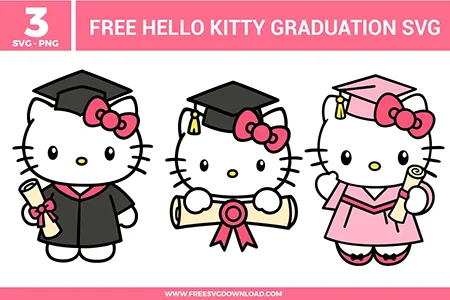
| Total Designs | 3 Items (See grid below) |
| Primary File Type | Scalable Vector Graphics (.svg) |
| Secondary Formats | High-Res PNG (300 DPI) |
| Compatibility Tested | Cricut Design Space, Silhouette Studio, Brother ScanNCut |
| Best For | Graduation Caps, Party Banners, Senior Gifts, Memory Books. (Vinyl & HTV) |
| License Type | Personal Use Only |
| Cut Complexity | Intermediate (Multi-Layer) |
These Free Hello Kitty Graduation SVG files are part of our TV Shows & Movies SVG category, where we organize all beloved Tv character designs in one place. This category includes a wide range of scary, funny and adventurous SVG files created for graduation caps, senior shirts, and ceremony announcements. Additionally, these designs are also part of our School SVG category, which features a variety of studious, celebratory, and academic SVG files created for memory books, diploma folders, and party favors.
To ensure the thin black lines of the scroll and ribbon remain intact, use a high-tack StandardGrip mat and a sharp Fine-Point blade. I recommend using the “Intricate Cut” setting or reducing the cut speed in your software, as slower speeds allow the blade to navigate the tight curves of the scroll without catching or lifting the vinyl.
To avoid a bulky feel on a t-shirt, use the “Slice” tool in Cricut Design Space or “Subtract” in Silhouette Studio to create a knockout in the black cap where the bow sits. This allows the red vinyl to lay directly on the fabric instead of on top of the black layer, ensuring a more durable and professional-looking application.
Absolutely. When using glitter Heat Transfer Vinyl, you will need to increase the cut pressure on your machine because glitter material is significantly thicker than standard vinyl. Also, remember that most glitter HTV is a “cold peel,” so wait until the material has completely cooled before removing the carrier sheet to keep the tassel edges crisp.
Use the “Print Then Cut” feature by importing the SVG and adding a white “Offset” border (about 0.05 to 0.1 inches) around the character. This creates a solid white background that makes the character pop and provides a stable edge for the cutting blade, which is much more effective than trying to cut directly along the character’s thin black outlines.
When scaling down for small items like keychains, the tassel lines can become extremely thin. To maintain their durability, I recommend adding a very small “Offset” to the entire design to thicken the lines. Always check your “cut lines” preview in the software to ensure the machine will be able to distinguish the paths at the smaller dimension.
These Hello Kitty Graduation SVG files are provided for personal use only, and resale or redistribution of the designs is not permitted. You are welcome to explore more free SVG designs across our website, including a wide range of themed and character-based collections.
If you experience any issues with downloading or using the files, feel free to reach out through our contact page and we will be happy to help. We also appreciate feedback from our community, so you’re welcome to leave a review below and share your experience.
For professionally curated bundles and extended design sets, you can also browse our premium SVG collections in our official store. Thank you for crafting with Free SVG Download, and enjoy creating your projects.